Creators assume multistream means a paid Restream or StreamYard plan. The map is messier than that.
Free multistream exists. Restream Free does two destinations. OneStream Live does two. Streamlabs Desktop will send one horizontal and one vertical canvas without Ultra. OBS plus a free multi-RTMP plugin will send as many copies as your uplink can hold.
Videorc is not the only free multistream app. It is an open-source desktop studio for Mac, Windows, and Linux where the extra copies leave from your machine, and the marketing promise is 6+ simultaneous destinations at 1080p30 where the current build supports it.
The interesting split is not “paid vs free.” It is who pays when you add a third platform.
TL;DR
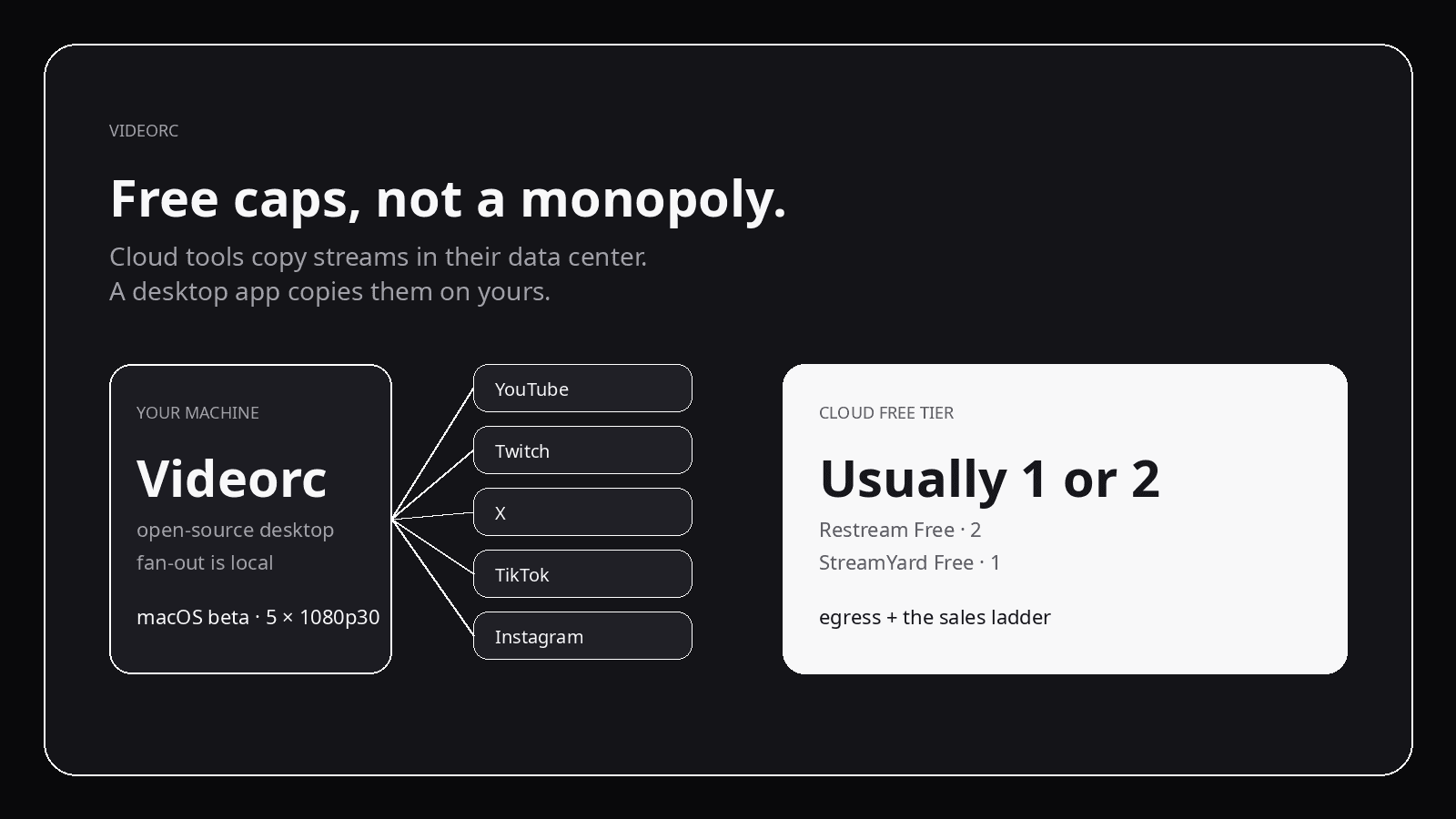
- Cloud tools cap free at 1–2 because they copy your stream in their data center.
- Client-side tools (Videorc, OBS) copy it on your computer. The vendor is not billed per destination.
- Videorc: free local record, free multistream to 6+ at 1080p30, on Mac, Windows, and Linux.
- Premium is live captions and Orcle, Videorc's AI, not more destinations or quality.
- Want the setup steps instead of the map? How to multistream for free.
Free caps, checked Sep 2026
Public plan pages move. This is what the free tiers said when we checked.
| App | Free simultaneous | What that actually means |
|---|---|---|
| Videorc | 6+ | Where the current build supports it. Fan-out on your machine. |
| Restream Free | 2 | Branding on the stream. Facebook Pages and custom RTMP are usually paid. |
| StreamYard Free | 1 | No free multistream. One destination. |
| Streamlabs Desktop | Dual Output | One horizontal + one vertical. Same-orientation or 3+ needs Ultra. |
| OneStream Live Free | 2 | Cloud copy, two destinations. |
| Castr | Trial / paid | No lasting free multistream. |
OBS plus a free multi-RTMP plugin is a different category: DIY, unlimited in software, no product around it. That side-by-side lives in OBS vs Videorc for multistream.
Copying one encode to five RTMP endpoints is ordinary desktop work. Cloud free tiers stop earlier because each extra copy is their egress and their sales ladder.
Why cloud apps stop at two
Restream, StreamYard, OneStream Live, and Castr take one inbound encode and fan it out on their servers. You upload once. They pay to send N copies to YouTube, Twitch, and whoever else you ticked.
That bill is real: egress, transcode, and the studio session sitting in their region. A free tier that did five destinations at 1080p would be a cost center with no upgrade path.
So the free cap is usually two — or one, if the product is a browser studio that wants Core or Advanced to do the rest. StreamYard Free is honest about this: no multistream. Restream Free gives you two channels and keeps Facebook Pages and custom RTMP on paid plans. Castr does not keep a lasting free multistream at all.
None of that means three destinations are hard. It means three destinations are how they get paid.
Client-side fan-out is a different invoice
Videorc and OBS do the copy on the computer you already own. The vendor is not billed when you add destination four.
That is the whole architectural difference. It is also the trade-off: upload bandwidth is yours. Five copies leave your NIC. If you have 15 Mbps up, you do not have five healthy 6 Mbps streams. Cloud relays sell the fact that you upload once.
Videorc does not invent this category. OBS plus a multi-RTMP plugin has been the builder workaround for years. Videorc is the open-source studio that makes that fan-out a first-class destination list instead of a plugin stack.
What Videorc actually gives free
The site promise, where the current build supports it:
- Local recording, including 4K capture, with no watermark and no time-limited trial.
- Multistream to 6+ destinations at once at 1080p30.
- A single stream up to 4K30 on YouTube, 1080p on other platforms.
- YouTube, Twitch, X, TikTok, Instagram, or any RTMP server — when that platform has given you a key.
Premium does not buy more destinations. Every plan includes 6+ destinations. Multistreams stay at 1080p30 on every tier.
Premium is the server-backed tools:
- Live captions (early alpha), with a synced
.srt. - AI publish: transcript, title, description, chapters, highlights.
- Live Co-host and the audio / edit lab.
If a landing page ever reads like Premium unlocks “more platforms,” that page is wrong.
Caveats that are not fine print
A destination only exists if the platform issues ingest credentials. TikTok LIVE Studio approval is not a stream key. Instagram eligibility is Instagram’s. Videorc cannot mint a key TikTok or Instagram never showed you.
Videorc is available on Mac, Windows, and Linux. Mac is the established beta; Windows and Linux are alpha. Check the download page for what the current build on your OS supports.
Bandwidth, CPU, and encoder headroom sit on your machine. Cloud tools hide that. Desktop tools cannot.
What this is not
This is not a claim that Videorc invented free multistream, or that 6+ is a law of physics. It is a map of the free caps, and why a desktop encoder can offer more of them without a sales ladder.
Use Restream if you want one upload and their chat overlay. Use StreamYard if the browser studio is the product. Use OBS if you want the plugin ecosystem. Use Videorc if you want the destinations on your desktop and the code on GitHub. The per-platform setup lives in the multistream guide.
FAQ
Are you the only free multistream app?
No. Restream Free, OneStream Live Free, and Streamlabs Dual Output all send more than one feed without a subscription. OBS plus a free multi-RTMP plugin does too. Videorc’s difference is client-side fan-out with 6+ destinations, not a monopoly on $0.
Why do cloud tools cap free at two?
Each extra copy is their egress and compute. Two is enough to show the feature. Three-plus is the paid rung. That is a business constraint, not a streaming constraint.
Does Streamlabs Dual Output count as free multistream?
It counts as two outputs of different orientations: one horizontal, one vertical. Same-orientation pairs and three-plus destinations are Ultra. Useful. Not the same as 6+ independent RTMP cards.
What does Videorc Premium add if multistream is free?
Live captions and Orcle, Videorc's AI. Not more destinations and not more quality: a single stream goes up to 4K30 on YouTube on every plan, and multistreams stay at 1080p30 on every plan.
Does this work on Windows today?
Yes. Videorc is available on Mac, Windows, and Linux. Mac is the established beta; Windows and Linux are alpha. Check the download page for the current build on your OS.